Enterprise View
Enterprise View is a section of the AiFi Console that gives you a consolidated view of sales performance, customer traffic, and key business indicators across all of your organizations — in one place.
Whether you manage a few or several organizations, Enterprise View helps you spot trends, compare performance, and make data-driven decisions without switching between individual dashboards.
Enterprise View includes two areas accessible from the sidebar under Data: Metrics for visual dashboards, and Reports for generating downloadable data exports.
Metrics
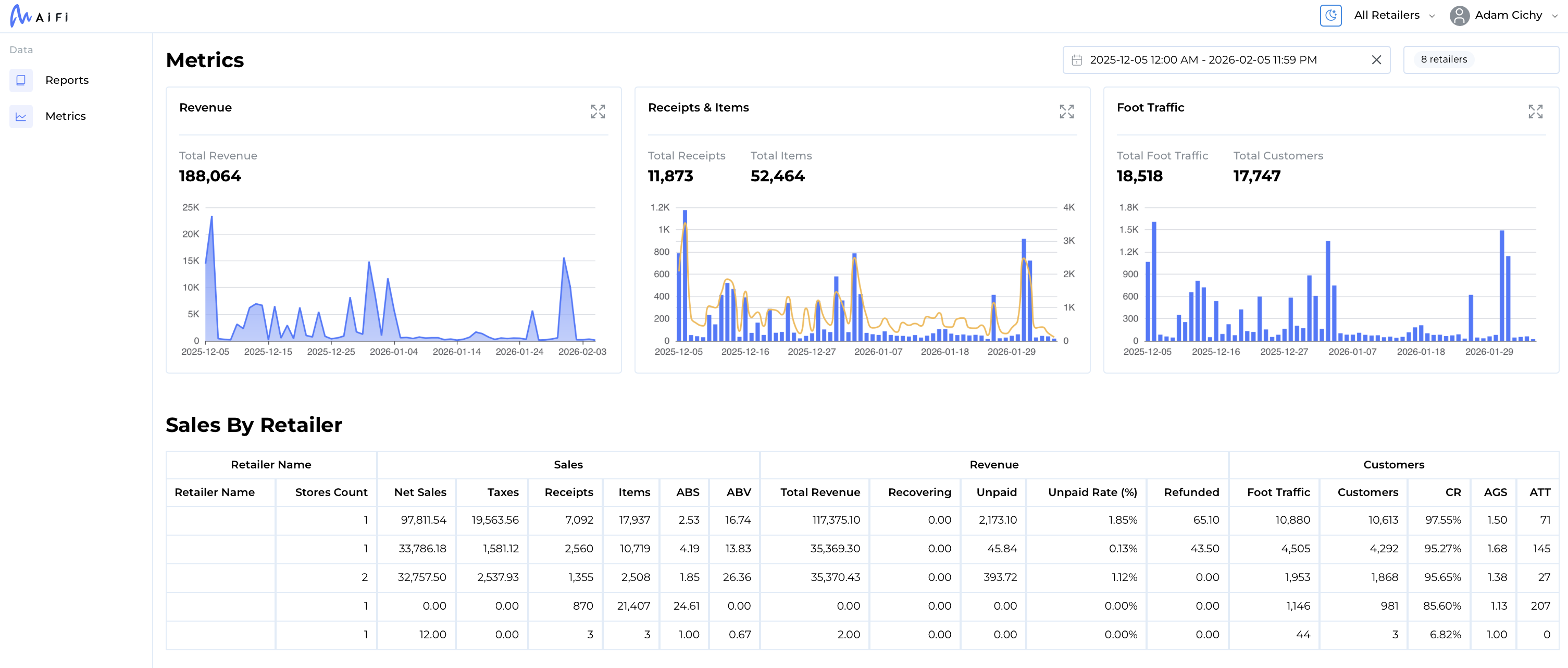
The Metrics dashboard provides interactive charts and a detailed comparison table spanning all of your organizations.
Sales Over Time
Track total revenue trends across your stores with an interactive time-series chart. View how sales performance evolves day-over-day, week-over-week, or month-over-month to identify seasonal patterns and growth opportunities.
Receipts & Items Over Time
Monitor the volume of transactions and items sold over time. Use this view to understand purchasing patterns, measure the impact of promotions, and compare activity levels across periods.
Foot Traffic Over Time
Visualize shopper and customer traffic trends across your locations. Understand how many people visit your stores versus how many convert to paying customers, and how these patterns change over time.
Sales by Retailer
A detailed breakdown table comparing performance across all of your organizations, including:
Sales
- Net Sales and Taxes
- Total Receipts and Items
- Average Basket Size (ABS) — average number of items per transaction
- Average Basket Value (ABV) — average value per transaction
Revenue
- Total Revenue
- Recovering and Unpaid amounts
- Unpaid Rate (%)
- Refunded amounts
Customers
- Foot Traffic and Customer counts
- Conversion Rate (CR) — percentage of shoppers who make a purchase
- Average Group Size (AGS)
- Average Trip Time (ATT)
Metrics Features
- Multi-retailer filtering — Select specific organizations to compare, or view all at once
- Flexible date ranges — Choose any custom date range to focus your analysis
- Time zone support — View data in the time zone that makes sense for your business
- Expandable charts — Click any chart to expand it to a full-screen view for deeper analysis
Reports
The Reports section lets you generate and download detailed Excel reports covering transactions, products, and tax data across your organizations.
Available Report Types
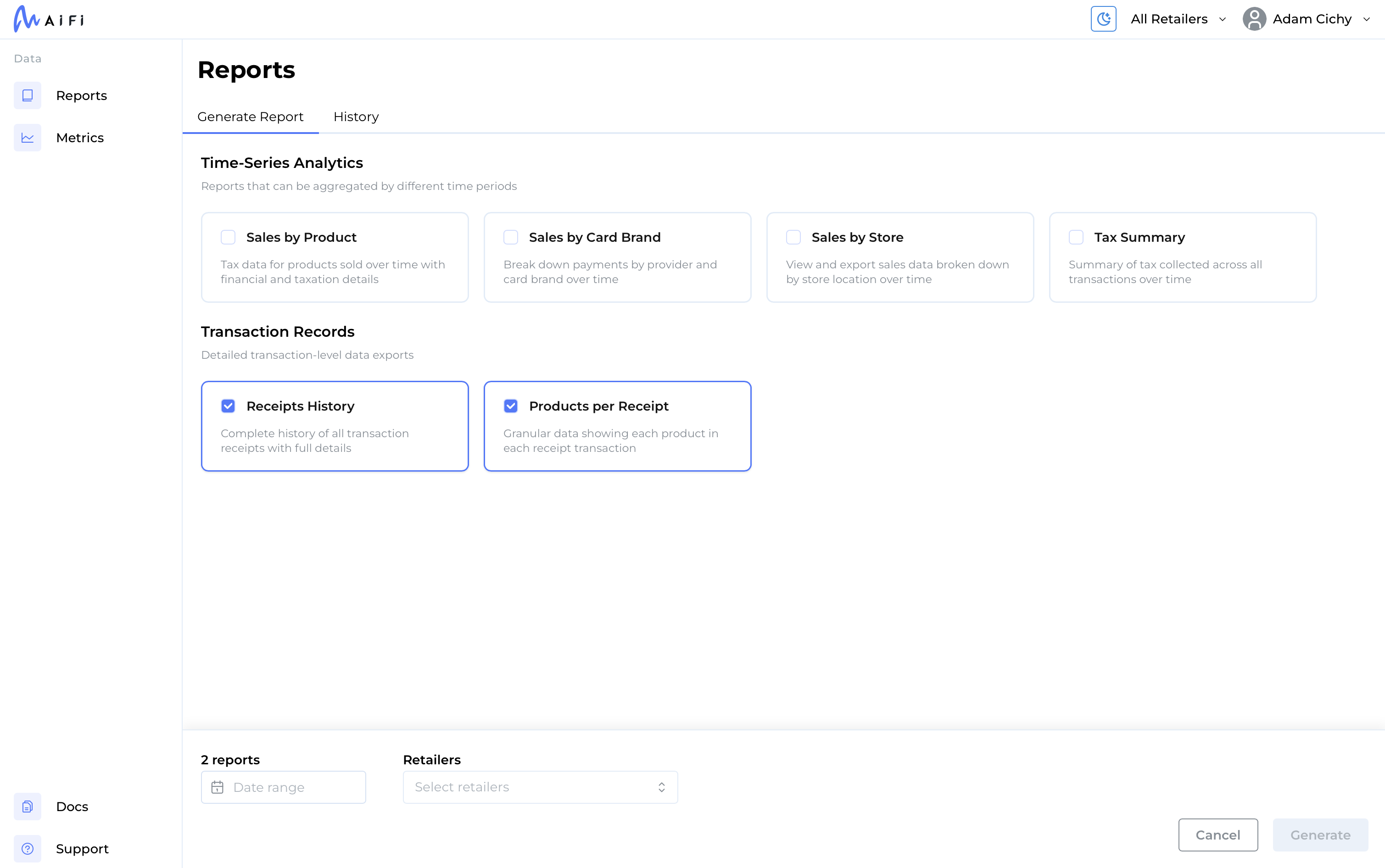
Time-Series Analytics
- Sales by Product — Tax data for products sold over a selected period, with financial and taxation details
- Sales by Card Brand — Payment breakdown by provider and card brand over time
- Sales by Store — Sales data broken down by individual store location over time
- Tax Summary — Summary of tax collected across all transactions over time
Transaction Records
- Receipts History — Complete history of all transaction receipts with full details
- Products per Receipt — Granular data showing each product within each transaction
How It Works
- Select one or more report types
- Choose the organizations to include
- Set a date range and time zone
- Click Generate to start report creation
Reports are generated in the background. You can track progress in the History tab, where each report shows its current status — Pending, In Progress, Ready, or Error. Once a report is ready, click the download button to get the Excel file.
Reports Features
- Bulk generation — Generate multiple report types in a single request
- Cross-organization scope — Each report can span one or many organizations
- Report history — View and re-download previously generated reports at any time
- Background processing — Continue working while reports are generated; you will be notified when they are ready
Getting Started
Enterprise View is available under All Retailers in the main retailer navigation for users with multiple organizations assigned.
- Metrics requires the Metrics View role
- Reports requires the Reports View role
If you don't see the Enterprise section or either of these options in your navigation, contact your administrator to request access.